Quick Menu Panel
The Quick Menu Panel is a dockable editor tab that serves as a central hub for configuration and support.
Open it: Window → Quick Menu Panel
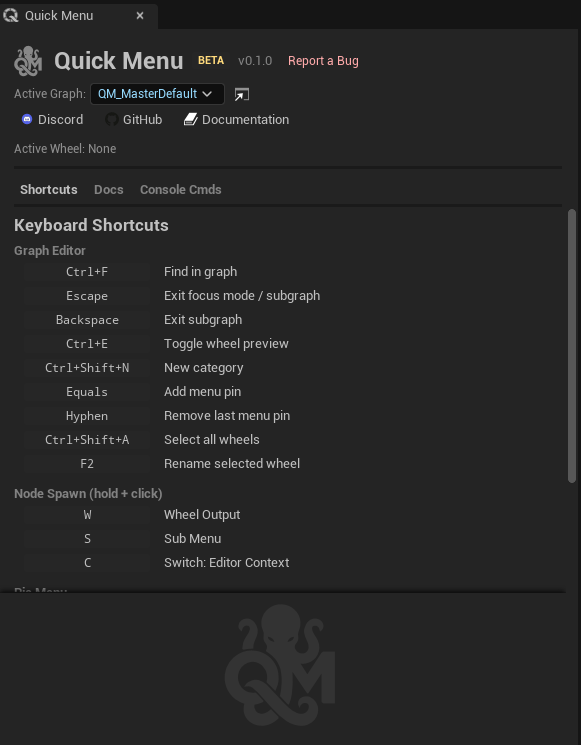
Header
- Active Graph dropdown — quickly switch which graph is active without going to Project Settings
- Activation Mode selector — Click & Release / Click Only / Release Only
- Support links — clickable icons for Discord, GitHub, and Wiki
Tab 1 — Shortcuts
Lists all keyboard shortcuts organized by section (Pie Menu, Node Spawn, Graph Editor).
- Each shortcut has an editable key binding badge — click it, press a new key to rebind
- Reset button appears when a binding has been changed from default
- Node Spawn shortcuts show the hold+click shortcuts (W, S, C by default)
See Keyboard Shortcuts for the full list.
Tab 2 — Docs
Built-in documentation of all node types and action types.
- Organized by category, browsable in-editor
- No need to leave the editor to look up what a node does
Tab 3 — Console Commands
A searchable list of console commands with one-click Run buttons.
Sources:
- From Active Graph — lists all ConsoleCommand action nodes found in the active graph
- Predefined categories — Performance Stats, Rendering Stats, Engine Stats, Memory & Objects, Visualization Toggles, Rendering Settings, Framerate, Cleanup & Misc (55 predefined commands covering
stat,show,r.,sg.,t.MaxFPS,slomo, and more) - Custom commands — user-defined commands from Project Settings
Features:
- Toggle commands on/off
- Commands with configurable values display editable fields (not just Run buttons), allowing direct value editing from the panel
- CVar state capture and reset to initial values
- Search/filter across all commands
- Add/remove custom commands
Support Links
| Link | URL |
|---|---|
| Discord | discord.gg/YYc2v8k5BA |
| GitHub | github.com/Bassounet/QuickMenu-Plugin |
| Wiki | github.com/Bassounet/QuickMenu-Plugin/wiki |
Report bugs via GitHub Issues. Join Discord for community support and feature requests.