Structural Nodes
These nodes define the structure of your menu graph — the flow from entry point to pie menu display.
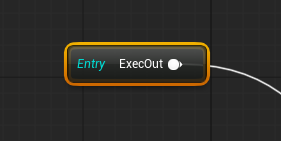
Root
- One per graph, cannot be deleted
- Single exec output pin
- Starting point for menu evaluation
- Every graph must have exactly one Root
WheelOutput
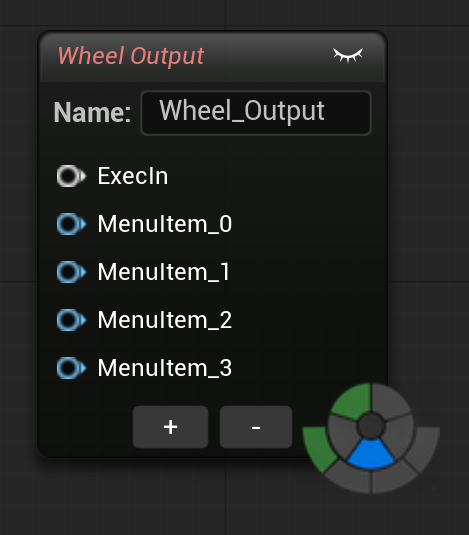
The terminal node that defines a pie menu wheel. Each input pin becomes one wedge.
Properties:
| Property | Type | Default | Description |
|---|---|---|---|
| WheelName | String | "Wheel" | Display name in the Wheel List and for Go To Wheel navigation |
| Category | String | — | Groups this wheel in the Wheel List sidebar |
| SortOrder | int32 | 0 | Sort priority within its category |
| NumMenuPins | int32 | 4 | Number of menu input pins (1–10) |
| Rotation (°) (1.0.4) | float | 0 | Per-graph wheel rotation in degrees. Editable inline via SpinBox on the node and adjustable live with Shift + Middle-drag while the wheel is open |
| Snap to Angle (1.0.4) | bool | false | When on, rotation snaps to multiples of Snap Angle Degrees |
| Snap Angle Degrees (1.0.4) | float | 0 | Snap step in degrees. 0 = auto 360° / NumMenuPins (snap to wedge boundaries) |
| Wheel Display Mode | enum | Radial Buttons (since 1.0.7) | Wedges (classic pie) or Radial Buttons (vertical list layout). Since 1.0.7, new WheelOutput nodes are born in the list layout, matching the Force List Mode On All Wheels default; the classic wedge wheel remains one click away on the node |
| Inherit Mode to Children (1.0.5) | bool | true | When the wheel is in Radial Buttons (list) mode, all sub-menus opened from it also render as vertical list boxes instead of falling back to wedge rings, keeping the visual style consistent across nested rings. Uncheck to restore the previous alternating behavior (root in list, sub-menus in wedge). Wedges mode is unaffected. |
Note: Wedge colors and icons are set on individual action and SubMenu nodes (via
WedgeColorandIconBrushName), not on the WheelOutput node.
Pins:
- 1 exec input (white) — receives execution flow
- N menu inputs (blue) — each pin = one wedge (max 10)
Adding/removing pins:
- Select the node and press = to add a menu pin
- Press - to remove the last menu pin
- Or right-click → Add Menu Pin / Remove Menu Pin
SubMenu
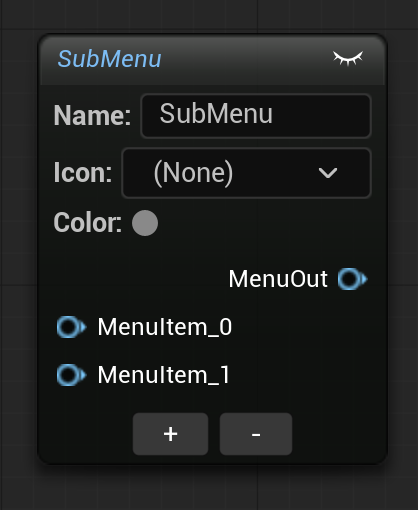
Groups actions into an expandable wedge. When the user hovers this wedge in the pie menu, children expand as a nested ring.
Properties:
| Property | Type | Default | Description |
|---|---|---|---|
| SubMenuName | String | "SubMenu" | Display name shown on the parent wedge |
| WedgeColor | LinearColor | Transparent | Custom color for this wedge |
| IconBrushName | Name | None | Slate brush for the submenu icon |
| NumMenuPins | int32 | 2 | Number of child menu input pins (1–16) |
Pins:
- 1 menu output (blue) — connect to a WheelOutput or another SubMenu pin
- N menu inputs (blue) — children, each pin = one child wedge
Nesting: SubMenus can be nested up to 4 levels deep (sub-menu within sub-menu).
Pin auto-naming: When you connect an action node to a menu pin, the pin's friendly name updates to match the action label (e.g., "Translate", "Rotate" instead of "Pin 0", "Pin 1").
Sequence
Executes multiple actions sequentially from a single wedge, with an optional delay between each. Connect action nodes to its menu input pins — they fire in order (pin 0 first, then pin 1, etc.).
Use case
Create a "Save & Compile" wedge that saves the Blueprint, waits 100ms, then compiles it — all from one click.
Properties:
| Property | Type | Default | Description |
|---|---|---|---|
| SequenceName | String | "Sequence" | Display name of the sequence wedge |
| DelayMs | float | 0 | Delay in milliseconds between actions (0–10000) |
| IconBrushName | Name | None | Slate brush for the sequence icon |
| IconTexture | Texture2D | None | Custom icon texture |
| NumMenuPins | int32 | 2 | Number of action input pins (1–16) |
Pins:
- 1 menu output (blue) — connect to a WheelOutput or SubMenu pin
- N menu inputs (blue) — each pin = one action to execute in order
Subgraph
Encapsulates a self-contained sub-graph inside a single node. This lets you build complex menu logic in an isolated graph and keep your main graph clean.
Each Subgraph node owns its own graph containing a TunnelEntry (entry point) and a WheelOutput. Double-click the node to open the contained sub-graph.
Properties:
| Property | Type | Default | Description |
|---|---|---|---|
| SubgraphName | String | "Subgraph" | Display name of the subgraph node |
Pins:
- 1 exec input (white) — receives execution flow
Note
Subgraph nodes cannot be duplicated. Each one is unique with its own internal graph.
TunnelEntry
Entry point inside a Subgraph's sub-graph. Automatically created when a Subgraph node is created.
- Cannot be deleted or duplicated
- Single exec output pin
- One per sub-graph
- Functions like a Root node, but inside the Subgraph scope
Comment
Standard comment block for organizing the graph visually. Press C in the graph editor to create one around selected nodes.
- Supports custom colors via a color picker in the Details panel
- Drag to move the comment and all nodes inside it
- No effect on menu evaluation — purely organizational