Quick Menu Panel
The Quick Menu Panel is a dockable editor tab that serves as a central hub for configuration and support.
Open it: Window → Quick Menu Panel (auto-opens on first plugin activation)
New in 1.0.7 — Setup Transfer & a leaner tab bar
The Plugin settings tab now hosts Setup Transfer: export/import your complete Quick Menu configuration as a portable .qmsetup file. The panel is also down to 6 tabs — Live Preview was removed, Panels now sits first, and shortcut edits sync instantly across every open panel instance.
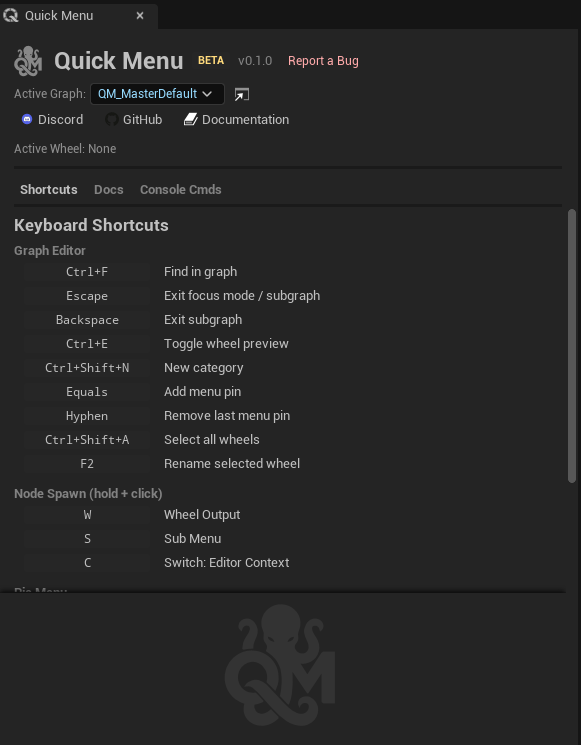
Header (hero card, redesigned in 1.0.5)
A tinted card containing three rows:
- Row 1 — brand: 44 px logo, bold
Quick Menu Paneltitle, dim subtitlevX.Y.Z · RELEASE. - Row 2 — controls: bordered toolbar block grouping
Graph: <active-graph picker>,+ New(creates a graph and opens it),↗ Open(opens the active graph). A vertical separator is followed by the active wheel chip (Wheel: <name | None>). - Row 3 — links: inline
Discord GitHub Docs Website, plus theReport Bugbutton (opens GitHub Issues).
The standalone Active Wheel: row and the duplicated bottom footer (logo + title + open-key reminder + duplicated links) were removed in 1.0.5; all that information now lives in the header.
Drag-reorderable tabs (1.0.5)
Every tab can be grabbed and dragged to reorder. Hovering shows an open-hand cursor and a subtle background highlight; dragging swaps to a closed-hand cursor with a floating decorator (the tab label) following the mouse. Drop targets show a thin accent line on the left or right edge depending on the cursor X position within the target tab, so you can insert between any two tabs.
The order is persisted per project in EditorPerProjectUserSettings.ini under [QuickMenuPanel] TabOrder=… and gracefully handles future tab additions (any unknown tab id is appended at the end).
Since 1.0.7, tabs advertise the gesture: each tab shows a small drag-handle icon (stronger on the active tab) and a Drag to reorder tabs tooltip.
The default order is Panels, Shortcuts, Plugin settings, Docs, Console Cmds, About (changed in 1.0.7), and the first tab in the bar is the active one when the panel opens. If you already reordered your tabs, your arrangement is kept.
Live Preview tab removed in 1.0.7
The Live Preview tab (added in 1.0.5) duplicated what the real wheel and the graph editor preview already show, so it was removed — the panel is down to 6 tabs. For appearance tuning feedback, use the wheel itself or the graph editor preview.
Tab 1 — Panels
Create and manage Quick Panels: small dockable toolbars that keep your favorite actions visible while you work — create, rename inline, open/close, delete, and share as .qmpanel files, with drag & drop from the wheel.
Tab 2 — Shortcuts
Lists all keyboard shortcuts organized by section (Pie Menu, Node Spawn, Graph Editor).
- Each shortcut has an editable key binding badge — click it, press a new key to rebind
- Reset button appears when a binding has been changed from default
- Node Spawn shortcuts show the hold+click shortcuts (W, S, C by default)
Synced across panel instances (1.0.7): shortcut values have a single source of truth. Change a binding anywhere — a panel's shortcut row, the settings details view, a graph editor command chord, or a setup import — and every open Quick Menu panel refreshes its Shortcuts tab immediately, so all instances always show the same live values and two shortcuts can no longer silently share one key.
See Keyboard Shortcuts for the full list.
Tab 3 — Plugin settings (renamed in 1.0.5)
Previously "Settings". Renamed to Plugin settings in 1.0.5 to disambiguate from Unreal's own Edit → Project Settings → Plugins → Quick Menu window.
The tab mirrors the Project Settings object directly — the same underlying UQuickMenuSettings instance, with no separate handcrafted UI. Every setting you can change in Edit → Project Settings → Plugins → Quick Menu is editable here too, organized under the same groups:
- Primary Binding — Active Graph (Legacy), Open Menu Key (Legacy), Edit Wheel Key
- Hotkeys — Enable Custom Gesture Hotkeys, Hotkey Bindings, Node Spawn Shortcuts
- Interaction — Activation Mode, Wheel Edit Mode Activation
- Behavior — Offer Create Wheel, Allow Wheel During Play In Editor
- Appearance — Force Neutral Gray Wedges, Gray Separator Darkness, Icon Size Multiplier, Wheel Size Multiplier, Wedge Gap, List Menu Distance
- Console — Custom Console Commands
Full-height layout (1.0.5): the property editor uses the entire tab height with its own scroll view. A Reset Wheel Appearance button restores the appearance overrides to defaults.
Settings persist across editor restarts (1.0.5): all write paths route through TryUpdateDefaultConfigFile() on the defaultconfig UQuickMenuSettings class, so every UPROPERTY(config) (open-menu hotkey, active wheel, hotkey gestures, node spawn shortcuts, "Show Add Button In Wheel", "Allow Wheel During Play In Editor", custom console commands, etc.) is now correctly written to Config/DefaultEditor.ini and survives editor restarts.
See Project Settings for the full reference.
Setup Transfer (1.0.7)
At the bottom of the Plugin settings tab, a Setup Transfer section carries your whole Quick Menu setup between projects and machines:
Export Setup…writes a portable.qmsetupJSON file covering every config setting by reflection — hotkeys and gesture bindings, node-spawn shortcuts, custom console commands, activation mode, active graph, all appearance values — plus all Quick Panels (same graph/node reference model as.qmpanel).Import Setup…asks for confirmation before overwriting your current settings, then applies instantly: settings persist to the project + per-user inis, the wheel hotkey re-binds, and the pie menu refreshes — no editor restart.- Quick Panels import additively: a panel from the file is recreated only if no existing panel has the same name; your current panels are never overwritten.
- Cross-version: a setup exported from a UE 5.8 project imports cleanly into a UE 5.0 project.
Tab 4 — Docs
Built-in documentation of all node types and action types.
- Organized by category, browsable in-editor
- No need to leave the editor to look up what a node does
Tab 5 — Console Commands
A searchable list of console commands with one-click Run buttons.
Sources:
- From Active Graph — lists all ConsoleCommand action nodes found in the active graph
- Predefined categories — Performance Stats, Rendering Stats, Engine Stats, Memory & Objects, Visualization Toggles, Rendering Settings, Framerate, Cleanup & Misc (55 predefined commands covering
stat,show,r.,sg.,t.MaxFPS,slomo, and more) - Custom commands — user-defined commands from Project Settings
Features:
- Toggle commands on/off
- Commands with configurable values display editable fields (not just Run buttons), allowing direct value editing from the panel
- CVar state capture and reset to initial values
- Search/filter across all commands
- Add/remove custom commands
Tab 6 — About
Plugin overview, author credit, version string, and quick links to Docs, GitHub, and Support.
Support Links
| Link | URL |
|---|---|
| Discord | discord.gg/YYc2v8k5BA |
| GitHub | github.com/Bassounet/QuickMenu-Plugin |
| Wiki | github.com/Bassounet/QuickMenu-Plugin/wiki |
Report bugs via GitHub Issues. Join Discord for community support and feature requests.